My Personal Project (SOLO)
Sunken Bethlehem

Sunken Bethlehem, a 2D rogue-lite beat'em up and shoot'em up platformer game themed apocalypse, made on Stencyl. Inspired by Dead Ahead: Zombie Warfare, the game was solo developed within duration of 3 months of development time with the guidance and feedback of my course lecturer.
The game features a male protagonist who falled deep underground into a forsaken land, trapped amidst relentless hordes. To survive, scavenge any materials around to Build, Fortify, and Enchant—transforming the boy’s shelter and abilities against the coming threats. Craft powerful weapons, cook nourishing meals, and prepare for wave after wave of enemies, all in the struggle to escape the sunken realm.
Design Concept Overview
Game Core Loop
Explore Levels
Kill & Loot
Build Structures
Upgrade
Player explores diverse levels to defeat enemies and gather resources, which can then be used to build base structures that unlock stat boosts and weapon upgrades—enhancing both survival efficiency and overall gameplay experience.
Mechanic/ Features
Resources Farming & Management
-
15 unique usable resources that player can scavenge from the environment or obtain by defeating enemies.
-
Resources are essential for crafting, building, and upgrading progression systems.
Player Stats & Upgrades
-
Four core upgradeable stats: Health, Stamina, Armor, and Ammo.
-
Each stat improves dynamically based on the player’s actions and upgrade choices.
Player Attacks & Upgrades
-
Three core attacks: Punch, Kick, and Shoot.
-
Each attack deals varying damage and consumes stamina differently.
-
All attacks are upgradeable, allowing players to scale combat effectiveness over time.
Build & Craft
-
Construct base structures to unlock additional crafting recipes and progression systems.
-
Use resources to craft materials and enhance weapons, deepening both survival and combat options.
Development Progression
Before explaining my design progression, I would like to briefly introduce myself and my inspirations behind Sunken Bethlehem. As a developer with a strong passion for apocalypse and survival-themed games, I naturally infused the project with elements of resource management, crafting, and zombie enemies.
To support this vision, I implemented crafting menus across various structures, allowing players to upgrade their core stats and strengthen their character’s survival potential. The zombie enemies were designed and visually adapted with inspiration from Dead Ahead: Zombie Warfare, from an app named The Spriters Resource as a foundation for art modification to avoid infringement.
Art & Genre Direction
After finalizing the game design concept, I began creating all the game art assets personally using Aseprite. These assets were iteratively refined throughout development to improve the visual clarity and overall player experience. You can refer to the My Art section below for samples of the completed works.
Genre Constraint & Combat Design
Due to course requirements, the project was directed toward the Beat ’em Up and Rogue-lite genres. To align with this, I designed the player character with:
-
Two melee attacks: Punch and Kick.
-
One ranged attack: Pistol Shooting.
This balance of close-quarters and ranged combat gives players tactical variety while staying true to beat ’em up mechanics.
Rogue-lite Influence & Progression Systems
To incorporate rogue-lite elements, I designed temporary buff systems through cooking mechanics. Initially, players could prepare dishes at the Campfire Menu, intended to grant buffs before entering levels. However, due to programming constraints, these buffs were implemented as permanent stat boosts instead.
In addition, the Campsite Upgrade Menu was introduced, where players can spend in-game currency to upgrade maximum Health and Stamina, extending survival potential across multiple runs.
In-Game Scenes

< Game BASE (Initial) >
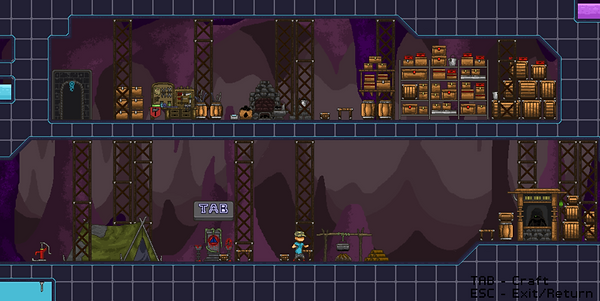
<< Game BASE (Upgraded) >>
The base begins with three core structures—Panel, Storage, and Water Pump—which can be expanded by constructing additional buildings through the Panel once sufficient resources are gathered. Each structure serves unique functions and provides crafting recipes that enhance progression, resource management, and the overall player experience.

< Panel Crafting Menu (Initial) >

<< Panel Crafting Menu (Built) >>
In addition, four extra structures can be constructed to unlock advanced crafting recipes, enabling further upgrades to player stats and increasing weapon damage for deeper game progression.

< Campfire Cooking Menu >
Player can cook four different dishes, each designed to boost player stats and weapon damage. Initially, in the begin of game design, these dishes were intended to provide temporary buffs; however, due to programming limitations, they were implemented as permanent upgrades instead. While this created a balance issue—making the buffs feel too inexpensive for their impact—it highlighted the need to adjust ingredient requirements for better progression balance.

< Campsite Upgrade Menu >
The Campsite is a base structure where player can upgrade their Health and Stamina across three tiers, improving survival potential. These upgrades are purchased using the in-game currency, encouraging player to balance resource spending between immediate survival and long-term progression.

< Crafting Station Crafting Menu 1 >

< Crafting Station Crafting Menu 2 >

< Crafting Station Crafting Menu 3 >
The Crafting Station provides a variety of recipes that players can use to upgrade their character with new abilities and enhancements. While many upgrades require common resources, the more powerful options demand rare loot dropped by specific enemies—encouraging players to take on tougher encounters for greater rewards.

< Water Pump Crafting Menu >
Water Pump allows players to purify Dirty Rags into Clean Rag. While it features only a single crafting recipe, it serves as a crucial utility during Dirty Rags are scarce.

< Store Buy & Sell Menu >
Once a Store is constructed, a Merchant appears, enabling players to buy or sell materials using in-game currency. This system allows players to offload excess resources or acquire those they lack to progress more efficiently. The Merchant’s personality is also reflected through his motto: 'You may make a small profit, but I will never lose money.

< Game Level Select >
From Level 2 onward, stages remain locked until the previous level has been explored and returned. As players progress, each higher-level map introduces greater dangers and tougher enemies, balanced by the opportunity to harvest significantly larger amounts of loot.

< Game Level Room>
Each game level was composed of varied rooms that gradually scale in difficulty, offering players a progression from easier encounters to more challenging ones, along with increasingly tough enemies to overcome.

< Treasure Room >
Treasure Rooms are special areas introduced from Level 3 onward up to the Boss level, designed to reward players with extra loot and resources as an incentive for exploration and progression.
My Art

< Basic Tiles, Items and Characters >

< Background Environment >

< Panel >

< Campsite >

< Crafting Station page 2 >

< Water Pump >

< Level Selection >

< Campfire >

< Crafting Station page 1 >

< Crafting Station page 3 >

< Storage Area >

< Store >

< Game Level Room UI >
When the player character enters a Game Level Room, a dedicated HUD interface is displayed. This UI communicates all essential survival and combat information in real-time, including:
-
Player Status: Health, Stamina, and Armor values for tracking survivability.
-
Ammo Count: Current bullet reserves for ranged combat readiness.
-
Inventory Tracking: A quick display of special items and normal resources scavenged from the current level.
The design ensures clarity and quick recognition, allowing players to manage their resources and make tactical decisions on the fly without interrupting gameplay flow.

< Covering Icons in Crafting Menus >

To implement the crafting system, I designed a one-time button interaction mechanic in Stencyl. When a button in a specific area is pressed, a unique covering icon is triggered to overlay the designated slot. At the same time, the original button is deleted from the scene, ensuring it functions as a single-use interaction.
This approach not only provides visual feedback to the player (confirming that the action has been taken) but also enforces the intended gameplay rule of one-time crafting actions in certain menus.